1. Export Markers from Avid Pro Tools
Open the Markers panel in Pro Tools and export the markers as the .txt file. Alternatively, you can choose "File > Export > Session Info As Text" from the Pro Tools menu and select the Include Markers option to create the text file containing the markers with their location, name, and comments.
2. Use the "Pretvornik označevalnikov" to convert the TXT Markers marker file into a CSV file
Open the free Pretvornik označevalnikov, select "Avid Pro Tools > TXT Marker (.txt)" and set "convert" to "CSV for Google Sheets". Generate and download the file. Če imate težave s pretvorbo datoteke, se lahko obrnete na brezplačno podporo.
3. Import the CSV file into Google Sheets
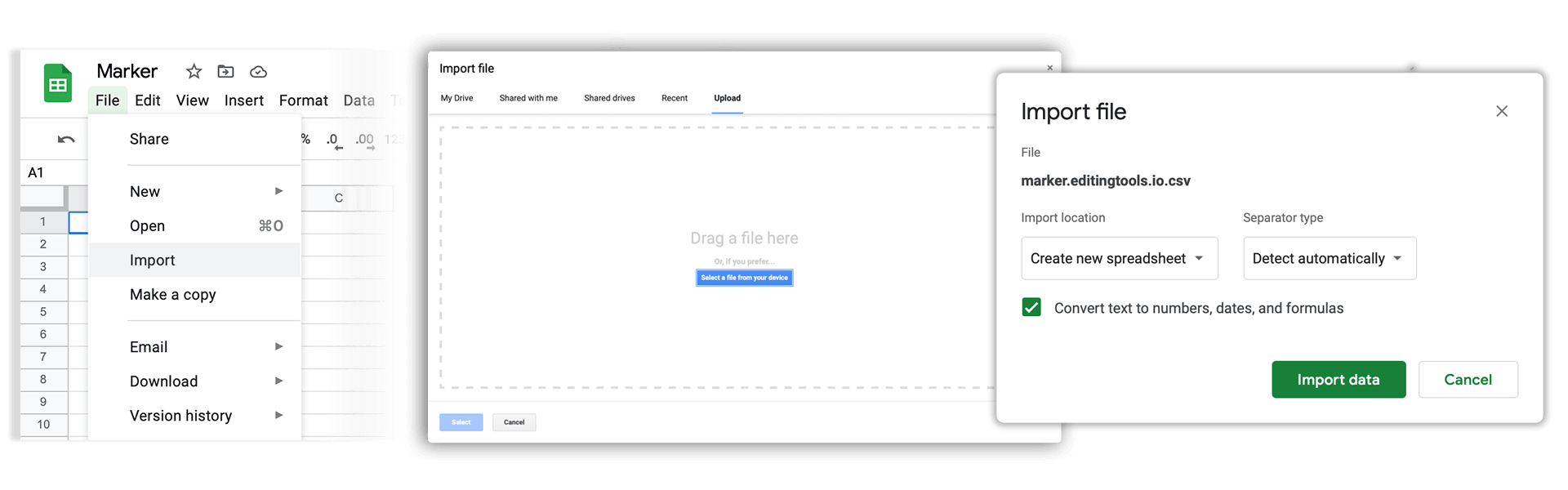
Open Google Sheets and go to "File -> Import". Upload the generated CSV file and press "Import Data" to generate the Sheet with all markers.
🚀 Končano
To je zaenkrat vse! Če se vam je ta vodnik zdel uporaben, ga delite in nas tako podprite. Če imate predloge, kako bi lahko potek dela izboljšali, nam jih sporočite!