1. Export an EDL marker file from DaVinci Resolve
- Select the sequence in your media tab.
- Make the right click on the sequence timeline in your media tab and it will open the popup.
- Navigate to: "Timeline > Export > Timeline Markers to EDL"
2. Use the "Pretvornik označevalnikov" to convert the EDL marker file into a CSV file
Open the free Pretvornik označevalnikov, select "DaVinci Resolve > Sequence (.edl)" and set "convert" to "CSV for Google Sheets". Generate and download the file. Če imate težave s pretvorbo datoteke, se lahko obrnete na brezplačno podporo.
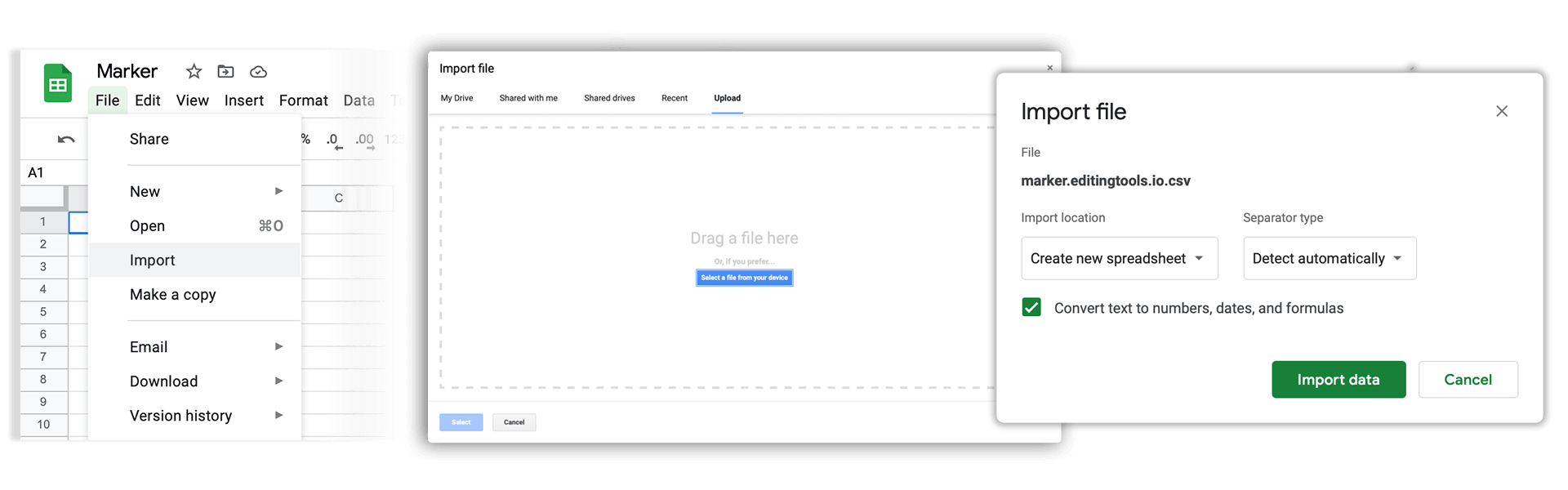
3. Import the CSV file into Google Sheets
Open Google Sheets and go to "File -> Import". Upload the generated CSV file and press "Import Data" to generate the Sheet with all markers.
🚀 Končano
To je zaenkrat vse! Če se vam je ta vodnik zdel uporaben, ga delite in nas tako podprite. Če imate predloge, kako bi lahko potek dela izboljšali, nam jih sporočite!